Bitwarden Review (2026): Best Free Password Manager?

Sunil Kumar
Founder & Editor, Locitra
Read our comprehensive 2026 Bitwarden review. Discover why it ranks as a top free password manager, and explore its security features and pricing.
Introduction
In an era where digital threats are increasingly sophisticated, managing dozens—if not hundreds—of complex passwords is an absolute necessity. However, paying exorbitant monthly subscription fees just to keep your digital identity secure shouldn't be required. Enter Bitwarden.
Over the past few years, Bitwarden has risen from an open-source niche tool to an absolute juggernaut in the cybersecurity landscape. In 2026, it frequently tops the lists of the best password managers, primarily because of its exceptionally generous free tier and transparent security practices. But is it the right choice for everyone?
In this comprehensive Bitwarden review for 2026, we will dive deep into its core features, analyze its world-class security protocols, compare its paid plans to its legendary free tier, and ultimately help you decide if it is the best free password manager for your specific needs.
What Is Bitwarden?
Before we dissect its features, it helps to understand what is a password manager exactly, and where Bitwarden fits into the picture. Bitwarden is a specialized software application that securely stores, generates, and auto-fills your passwords across all your devices.
What sets Bitwarden apart from its massive corporate competitors is its foundation. It is built entirely on open-source code. This means that instead of relying on a corporation's secretive internal development, the underlying code that powers Bitwarden is available for anyone in the world to inspect, audit, and verify. In the realm of What Is Cybersecurity, transparency is arguably the strongest form of security.
Furthermore, Bitwarden offers flexibility that few others can match. While most users rely on Bitwarden's secure cloud servers to sync their data, advanced users have the option to self-host their password vault on their own servers, providing total and absolute control over their data.
Bitwarden Features
A password manager is only as good as its usability in everyday life. Let’s break down the core features that make Bitwarden a standout choice in 2026.
Password Vault
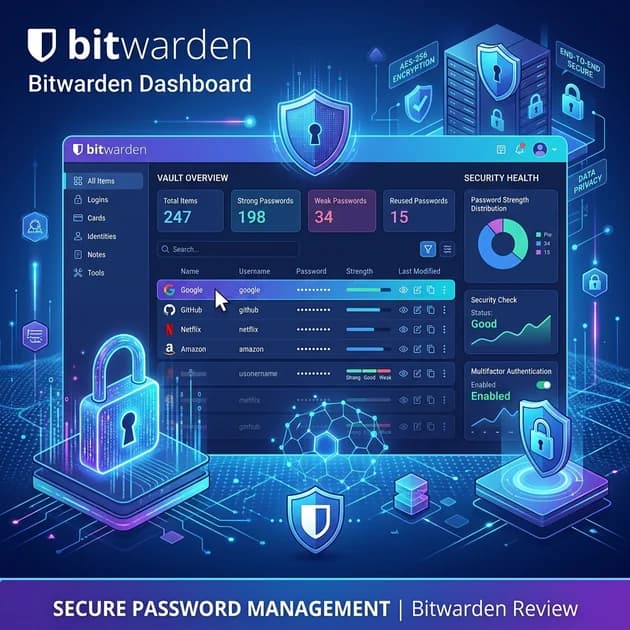
The Bitwarden password vault is where all your sensitive data lives. It is a highly organized, encrypted database that can store logins, secure notes, credit cards, and identities (like passport or driver's license numbers). The interface is clean, utilitarian, and gets straight to the point. While it might lack the flashy, colorful aesthetics of some competitors, it is incredibly efficient. You can easily organize your entries into custom folders, search through them rapidly, and access them from anywhere.
Password Generator
A strong password is the foundation of digital security. Bitwarden’s integrated password generator is highly customizable. By default, it generates complex strings of random characters, but you can adjust the length (up to 128 characters), toggle the inclusion of uppercase letters, numbers, and special symbols, or switch to generating "passphrases" (random strings of dictionary words), which are often easier to type on mobile devices.
Browser Extensions
Bitwarden’s browser extensions are where you will likely spend most of your time interacting with the software. They are available for Chrome, Firefox, Safari, Edge, Brave, and even niche browsers like Vivaldi. The extension seamlessly detects when you land on a login page and offers to auto-fill your credentials with a single click or keyboard shortcut. It also actively detects when you are creating a new account and prompts you to generate and save a strong password automatically.
Mobile Apps
Available on both iOS and Android, the Bitwarden mobile apps are robust and reliable. They integrate deeply with both operating systems' native auto-fill frameworks, meaning that whether you are logging into a mobile browser or a native app, your passwords are just a biometric scan (FaceID or fingerprint) away. The mobile apps also allow full management of your vault, so you are never tied to a desktop computer.
Secure Sharing
Sharing passwords via text message or email is incredibly dangerous. Bitwarden solves this with "Bitwarden Send." This feature allows you to securely share text (like a password) or files with anyone—even if they don't have a Bitwarden account. You can set expiration dates, limit the number of times the item can be accessed, and even require a password to open the link.
Two-Factor Authentication
Bitwarden not only secures your vault with Two-Factor Authentication (2FA), but its Premium tier also functions as an integrated authenticator app (like Google Authenticator or Authy). This means Bitwarden can store and auto-fill the 6-digit Time-based One-Time Passwords (TOTP) for your various online accounts, significantly streamlining the login process without compromising security.
Bitwarden Security
When evaluating a password manager, security is the single most important metric. Bitwarden excels in this arena, offering a level of transparency that breeds absolute trust.
Encryption Standards
Bitwarden utilizes AES-256 bit encryption, the global standard for securing top-secret data. Crucially, it employs a "zero-knowledge" architecture. This means your data is encrypted locally on your device using your Master Password before it is ever sent to Bitwarden's servers via What Is Cloud Computing infrastructure. Because Bitwarden never receives or stores your Master Password, it is mathematically impossible for them (or a hacker who breaches their servers) to read your data.
Open Source Advantage
The open-source nature of Bitwarden cannot be overstated. Proprietary software operates in a "black box"—you have to blindly trust the company that the code is secure. Bitwarden's code is public. Thousands of independent cybersecurity researchers and developers constantly scrutinize it, looking for vulnerabilities and suggesting improvements. This crowd-sourced security model is inherently more resilient.
Security Audits
In addition to continuous community scrutiny, Bitwarden regularly hires respected third-party cybersecurity firms (such as Cure53 and Insight Risk Consulting) to conduct rigorous, independent security audits and penetration tests. Bitwarden publicly publishes the results of these audits, demonstrating a commitment to radical transparency.
Bitwarden Pricing
Pricing is where Bitwarden truly leaves the competition in the dust. The structure is incredibly simple, fair, and accessible.
Free Plan
The Bitwarden Free plan is, without exaggeration, the best free password manager available in 2026. Unlike competitors who restrict you to a single device or a maximum of 50 passwords, Bitwarden Free offers:
- Unlimited password storage.
- Unlimited syncing across all your devices (desktop, mobile, tablet).
- Access to the secure password generator and Bitwarden Send (text only). For the vast majority of everyday users, the Free plan provides everything needed to secure their digital life.
Premium Plan
If you want advanced features, the Premium plan is astonishingly cheap—typically less than $10 per year. Upgrading to Premium unlocks:
- Integrated TOTP authenticator (auto-filling 2FA codes).
- Advanced Two-Step Login options (YubiKey, FIDO2, Duo).
- Emergency access (allowing trusted contacts to access your vault in a crisis).
- 1GB of encrypted file storage.
- Vault health reports (checking for breached, weak, or reused passwords).
Family Plan
The Family plan costs roughly $40 per year and covers up to 6 users. It includes all Premium features for every user, plus the ability to create secure "Organizations" to share specific logins (like streaming services or household bills) seamlessly between family members.
Business Plans
For enterprises and small teams, Bitwarden offers scalable business plans that include advanced administrative controls, user groups, single sign-on (SSO) integration, and active directory syncing, making it a highly viable competitor to enterprise giants like Keeper.
Bitwarden Pros and Cons
Every piece of software has trade-offs. Here is a balanced look at where Bitwarden shines and where it falls short.
Pros:
- The Free plan is unrivaled in the industry.
- Open-source transparency builds immense trust.
- Cross-platform compatibility is nearly flawless.
- Premium tier is drastically cheaper than competitors.
- Self-hosting is an option for advanced privacy advocates.
Cons:
- The user interface is functional but lacks the premium, polished feel of 1Password or Dashlane.
- Organizing large numbers of passwords requires manual folder creation, lacking the automated "tags" system found in some rivals.
- Advanced features like self-hosting or setting up custom TOTP fields can present a steep learning curve for non-technical users.
Bitwarden vs Competitors
To truly understand Bitwarden's position in the market, we must compare it to the other heavyweights.
Bitwarden vs 1Password
1Password is the premium standard for password management. It boasts an incredibly sleek interface, excellent customer support, and a unique "Secret Key" architecture for added security. However, 1Password does not offer a free tier, and its premium plan is significantly more expensive than Bitwarden's. If you want a flawless, premium experience and don't mind paying, 1Password is great. If you want maximum value and open-source transparency, Bitwarden wins.
Bitwarden vs Dashlane
Dashlane positions itself as an all-in-one security suite. Its premium plans often include a bundled VPN (similar to the standalone tools discussed in our guide to the best VPN services in 2026) and live dark web monitoring. However, Dashlane's free plan is severely limited to a single device. Bitwarden focuses purely on doing one thing—password management—exceptionally well for free.
Bitwarden vs NordPass
NordPass, built by the creators of NordVPN, offers a highly modern interface and utilizes XChaCha20 encryption. While its interface is arguably cleaner than Bitwarden's, its free version restricts you to only one active device connection at a time. Bitwarden remains the superior choice for users utilizing multiple devices simultaneously without wanting to pay a subscription fee.
Comparison Table
| Feature | Bitwarden | 1Password | Dashlane | NordPass |
|---|---|---|---|---|
| Open Source | Yes | No | No | No |
| Free Plan | Yes (Unlimited sync) | No (Trial only) | Yes (1 device, 50 passwords) | Yes (1 active device) |
| Premium Price (Individual) | ~$10/year | ~$36/year | ~$60/year | ~$30/year |
| Encryption | AES-256 | AES-256 + Secret Key | AES-256 | XChaCha20 |
| Integrated 2FA Authenticator | Yes (Premium) | Yes | No | No |
| Self-Hosting Option | Yes | No | No | No |
Who Should Use Bitwarden?
Bitwarden is the ideal choice for almost anyone looking to secure their digital footprint. Specifically, it is perfect for:
- Beginners and Budget-Conscious Users: The free plan offers everything you need to start practicing good digital hygiene without spending a dime.
- Privacy Advocates: The open-source nature and zero-knowledge encryption satisfy the strictest security purists.
- Tech Enthusiasts: The ability to self-host and interact with the software via Command Line Interfaces (CLI) provides ultimate control.
Is Bitwarden Worth It in 2026?
Without a doubt. In a market where software subscriptions are increasingly expensive, Bitwarden's commitment to providing a fully functional, highly secure, unrestricted free tier is genuinely remarkable. And if you decide you need the advanced features of the Premium tier, the $10 per year asking price is an absolute steal.
Bitwarden proves that world-class cybersecurity does not have to be a luxury reserved for those willing to pay a premium.
Frequently Asked Questions
Is Bitwarden's Free Plan safe to use?
Yes. The Free plan utilizes the exact same AES-256 bit zero-knowledge encryption as the Premium plan. Your data is just as secure on the free tier as it is on the paid tier.
Can Bitwarden see my passwords?
No. Because of its zero-knowledge architecture, all encryption and decryption happens locally on your device. Bitwarden only ever stores encrypted data on its servers, and they do not have your Master Password to decrypt it.
How does Bitwarden make money if the best plan is free?
Bitwarden generates revenue through its Premium subscriptions, Family plans, and highly successful Enterprise plans for businesses. This allows them to subsidize the robust Free tier for individual users.
Final Thoughts
As we push further into 2026, the necessity of a password manager is undisputed. The only question remains which one to choose. Bitwarden effectively answers that question for the vast majority of the internet. It provides a rare combination of uncompromising security, incredible value, and radical transparency.
If you have been putting off securing your digital life because of the hassle or the cost, Bitwarden eliminates every excuse. It is, undeniably, the best free password manager available today.
Related Articles
- Best Password Managers in 2026: Features, Pricing, and Security Compared
- What Is a Password Manager and Do You Really Need One? (2026)
- Best VPN Services in 2026: Which One Should You Choose?
- What Is Cybersecurity? A Beginner's Guide to Staying Safe Online (2026)
- What Is Cloud Computing? A Beginner's Guide to the Cloud (2026)
Weekly Intelligence
Stay Ahead of the Curve
AI tools, technology trends, digital income strategies and creator success stories — curated every week, always free.
No spam. Unsubscribe anytime.
Keep Reading
Related Articles
1Password Review (2026): Is It Worth the Investment?
Read our in-depth 1Password review for 2026. We cover its advanced security features, subscription pricing, and whether it is really worth it.
What Is a Password Manager & Do You Need One? (2026)
Wondering what is a password manager and exactly how it works? Discover the ultimate benefits of using one to improve your password security today.
Best Password Managers in 2026: A Full Comparison
Read our detailed comparison of the best password managers in 2026. We explore key features and evaluate security to help you find your match.